


2013-07-05
నల్లమోతు శ్రీధర్ సాంకేతికాలు: Firefox స్లోగా ఉంటోందా? ఇలా స్పీడ్ చేసుకోండి.. Must Watch
2013-07-04
నల్లమోతు శ్రీధర్ సాంకేతికాలు: Samsung Galaxy Note 2 Unpacking ఇక్కడ..
2013-07-03
నల్లమోతు శ్రీధర్ సాంకేతికాలు: పనీ, చదువూ disturb అవుతోందా? ఏ సైట్ నైనా ఓ కొద్ది సమయం ఇలా బ్లాక్ చేయొచ్చు Must Watch & Share
2013-07-02
నల్లమోతు శ్రీధర్ సాంకేతికాలు: మీ టివిలో ఇలాంటి సమస్యలు రావచ్చు.. భయపడకండి.. Must Watch & Share
desktoppublishing: పేజిమేకర్ ప్రాథమిక పరిగ్జ్నానం (Introduction)
2013-07-01
MAKE MONEY ONLINE -- SYED RAFIQ: ఇంటర్ నెట్ ద్వార(ఆన్లైన్) డబ్బు సంపాదించడం 100% నిజం,ఎలా? మీ కంప్యూటర్ కు ఇంటర్ నెట్ (Internet) కనెక్షన్ తో ఆదాయం(Income) పొందే మార్గాలను,ఆన్లైన్(Online) లో డబ్బు (Money) సంపాదించడం ఎలా ? ఈ బ్లాగు వివరిస్తుంది.
2013-06-30
MAKE MONEY ONLINE -- SYED RAFIQ: మీ జీవితం లో "an" పదం ఉంటె మీరు "HIT" లేదా "FLOP"
2013-06-29
వికీ పాఠాలు: వికీలో వెతకడం
వికీపీడియాలో చాలా సమాచారం ఉంది. ఆ సమాచారమంతటికీ ద్వారం లాంటిది వెతుకుడు పెట్టె (సర్చ్ బాక్స్).

ఈ పెట్టెలో టైప్ చేస్తుండగానే ఆ అక్షరాలతో ప్రారంభమయ్యే వ్యాసాలను సలహాలుగా చూపిస్తుంది. ఉదాహరణకు తెలుగు అని టైపు చెయ్యగానే తెలుగు భాష, తెలుగు వ్యాకరణం, తెలుగు సాహిత్యం,… ఇలా చూపిస్తుంది. వాటిల్లోంచి మనకు కావాల్సిన వ్యాసం మీద నొక్కితే ఆ వ్యాసానికి తీసుకు వెళుతుంది. లేదా వ్యాసం పూర్తి పేరును టైప్ చేసి ఎంటర్ నొక్కినా ఆ వ్యాసానికి తీసుకు వెళుతుంది.
ఒకవేళ మీరు ఇచ్చిన పేరుతో వ్యాసం లేకపోతే ఈ క్రింది విధంగా చూపిస్తుంది.
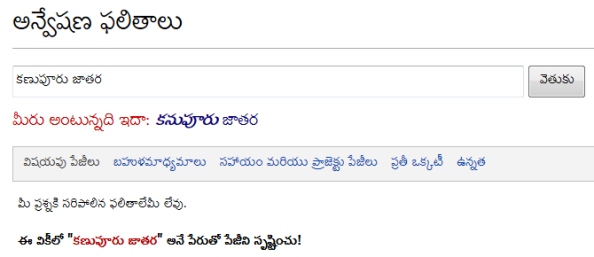
ముందుగా ఇచ్చిన పేరుకు దగ్గరగా ఏదైనా వ్యాసం ఉంటే ఒక వేళ ఆ వ్యాసం కోసం వెతుకుతున్నారేమో ఊహిస్తుంది. తరువాత ఎర్రటి అక్షరాలతో ఆ పేరుతో వ్యాసం సృష్టించడానికి ఓ లింకు ఇస్తుంది. ఒక వేళ మీరు ఆపేరుతో వ్యాసం రాయాలనుకుంటే ఆ లింకు మీద నొక్కి మీకు తెలిసిన సమాచారాన్ని చేర్చవచ్చు.
ఒక వేళ మీరు వెతుకుతున్న పేరుతో చాలా వ్యాసాలు గనక ఉన్నట్లయితే ఆ వ్యాసాలన్నింటికీ లంకెలతో కూడిన ఓ పేజీని చూపిస్తుంది. ఉదాహరణకు మీరు శ్రీనివాస్ అనే పేరుతో వెతికారనుకుందాం. అప్పుడు ఆ పేజీ ఇలా చూపిస్తుంది.
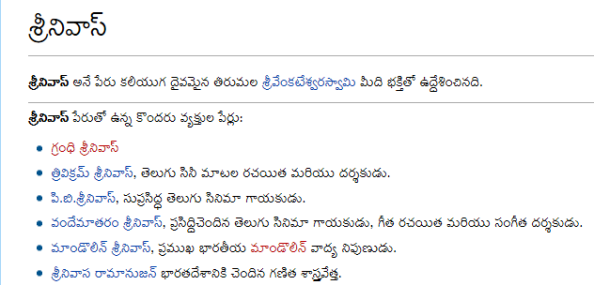
ఇది సాధారణంగా వికీలో ఉన్న సమాచారం(విషయపు పేజీలు) వెతికే విధానం. వికీలో సమాచారమే కాక ఓ వ్యాసాన్ని రాస్తున్నపుడు జరిగే చర్చలు, సభ్యుల చర్చా పేజీలు, ప్రాజెక్టు పేజీలు, మొదలైనవన్నీ ఉంటాయి. వాటిలో వెతకడమెలాగో వచ్చే టపాలో తెలుసుకుందాం.
2013-06-27
Bharath Radhekrishna: Error “Admin SVC must be running in order to create deployment timer job”
Hi All,
While Deploying a WSP solution into a WebApplication in Powershell. You may face the issue or error as:
“Admin SVC must be running in order to create deployment timer job”
To rectify it:
Just go to Enable the Services of SharePoint Administrator.
Go To Command Prompt and Type Services.msc. You will see a window contains all the list of services running.
Enable “SharePoint 2010 Administration” service.
Service name: SPAdminV4
Display Name: SharePoint 2010 Administration
Once you have Enabled or Started it that the command will run smoothly.

2013-06-25
వికీ పాఠాలు: అసలు వికీపీడియా అంటే ఏమిటి?
వికీపీడియా అంటే ఆన్లైన్ లో లభించే ఒక స్వేచ్ఛా విజ్ఞాన సర్వస్వం. విజ్ఞాన సర్వస్వం అంటే ప్రపంచ లో ఉండే అన్ని విషయాల గురించిన సమాచార భాండాగారం. వికీపీడియా అందరికీ ఉచితంగా అందుబాటులో ఉండటమే కాక అందులో ఉన్న సమాచారాన్ని ఎవరైనా మార్చగలరు, కొత్త సమాచారాన్ని చేర్చగలరు. అందుకే ఇది స్వేచ్ఛా విజ్ఞాన సర్వస్వం అయింది.
జనవరి 15, 2001 వ తేదీన జిమ్మీ వేల్స్, లారీ సాంగర్ లచే ప్రారంభించబడిన వికీపీడియా కొద్ది కాలానికే చాలా భాషల్లోకి విస్తరించింది. 2005 వ సంవత్సరంలో తెలుగు వికీపీడియా ప్రారంభమైంది. రెండు సంవత్సరాల పాటు బాలారిష్టాలతోనే కొనసాగిన తరువాత కొంతమంది బ్లాగర్ల సహకారంతో ఊపందుకుంది. ప్రస్తుతం తెలుగు వికీలో చిన్నా పెద్ద అన్నీ కలిపి సుమారు 50,000 వ్యాసాలున్నాయి. అదే ఆంగ్లంలో ఈ సంఖ్య సుమారు 42 లక్షలు. తెలుగు వికీలో వ్యాసాల సంఖ్య ఇంకా పెరగాల్సి ఉంది. అంతే కాకుండా ఉన్నా సమాచారాన్ని ఇంకా మెరుగులు దిద్దాల్సి ఉంది. అందుకు మీ అందరి సహకారం కావాలి. మీకు సహాయంగా సూచనలు, సలహాలు ఇవ్వడానికి ఈ బ్లాగు ప్రారంభించడం జరిగింది.
2013-06-22
Telugu Computer Tips & Tricks: technology
2013-06-13
Bharath Radhekrishna: Change Account display name of sharepoint user
We can use powershell command to change sharepoint user display name. Set-SPuser -identity “User name” -DisplayName “Display Name” -web Web url
Eg: Set-SPuser -identity “i:0#.f|fwamembershipprovider|kdc1″ -DisplayName “kdc1″ -web http://xyz:117/
In case you get access denied while changing the display name, run powershell as administrator/Farm admin.

2013-06-05
వీవెనుడి టెక్కునిక్కులు: తెలుగులో వర్డ్ప్రెస్!
2013-06-04
నల్లమోతు శ్రీధర్ సాంకేతికాలు: మీకు ఫుడ్ ఇష్టమైతే… అస్సలు ఈ వీడియో మిస్ అవకండి… :) Must Watch & Share
2013-06-03
నల్లమోతు శ్రీధర్ సాంకేతికాలు: మీ ఫోన్లకి Android లేటెస్ట్ వెర్షన్లు ఎందుకు రావట్లేదు? Must Watch & Share
2013-06-02
తెలుగు టెక్నాలజీ బ్లాగ్!!!: చైనా వస్తువులు ఎందుకు వాడకూడదు? కొన్ని కారణాలు
నల్లమోతు శ్రీధర్ సాంకేతికాలు: మీకు వెబ్సైట్లు ఓపెన్ కావట్లేదా? ఇదీ ఓ ముఖ్యమైన కారణమే! Must Watch & Share
2013-06-01
నల్లమోతు శ్రీధర్ సాంకేతికాలు: చిన్న Clapతో మీకు మీరే ఫొటోలు దిగేయొచ్చు ఇలా… Must Watch & Share
2013-05-31
వీవెనుడి టెక్కునిక్కులు: యూనికోడ్లో లోపాలు?
నల్లమోతు శ్రీధర్ సాంకేతికాలు: మీ లాప్టాప్ని సర్వీస్ సెంటర్ వాళ్లూ రిపేర్ చేయరు.. ఇలాగైతే!! :(
2013-05-30
నల్లమోతు శ్రీధర్ సాంకేతికాలు: మీకు పంపే ప్రతీ మెయిల్కీ కొంత ఖర్చు పెడుతున్నాం… ఆ విషయం గ్రహించండి.. ఏ మెయిల్నీ కాజువల్గా చూడకండి.. Must Read
2013-05-17
Telugu Computer Tips & Tricks: AP 10th Class/SSC Results 2013 Download with Grades/Marks
2013-05-09
ఉచిత స్వేచ్ఛా సాఫ్ట్వేర్లు: లిబ్రే ఆఫీస్ 4.0.3 విడుదలైంది
2013-05-06
ఉచిత స్వేచ్ఛా సాఫ్ట్వేర్లు: ఆపరేటింగ్ సిస్టంలని గన్న ఆపరేటింగ్ సిస్టం విడుదలైంది
2013-05-04
sowmyawrites .... » TechExperiences: Automated Grading and Counter Arguments-4 (last)
(Continued from Part-3)
***
Finding 9: machine scoring shows a bias against second-language writers (Chen & Cheng, 2008) and minority writers such as Hispanics and African Americans (Elliot, Deess, Rudniy, & Joshi., 2012]
Report-1: The best part about this report is the stance it takes. It immediately got me interested in it.
“Given the fact that many AWE programs have already been in use and involve multiple stakeholders, a blanket rejection of these products may not be a viable, practical stand.
…
..
A more pressing question, accordingly, is probably not whether AWE should be used but how this new technology can be used to achieve more desirable learning outcomes while avoiding potential harms that may result from limitations inherent in the technology.”
-This exactly has been my problem with these statements on humanreaders.org website.
The study primarily supports the idea of integrating human and machine assessments, by taking advantage of good things in both, as mentioned below:
“The AWE implementation was viewed comparatively more favorably when the program was used to facilitate students’ early drafting and revising process, and when the teacher made a policy of asking students to meet a preliminary required standard and subsequently provided human feedback. The integration of automated assessment and human assessment for formative learning offers three advantages….”
At least I did not find a direct mention about a “bias” against second language writers in this report! We need to stretch our imagination a bit to reach that conclusion!
Report-2: – The second report was already mentioned in Finding 7. Like before, I did not find a direct relevance of these results to this “finding”. However, I see the point in raising this issue. But, what I don’t understand is that this is just like some American coming and correcting Indian English  So, this kind of “bias” can exist in humans as well. What really is a way to handle this, manually or automatically? This does not make the case favourable to human assessment (IMHO).
Finding 10: for all these reasons, machine scores predict future academic success abysmally (Mattern & Packman, 2009; Matzen & Hoyt, 2004; Ramineni & Williamson, 2013 – not freely accessible)
- I actually did not go through these references beyond their intro and conclusion sections as I felt that “finding” is too much of a blanket statement to be connected to these findings. Skimming through the two freely accessible reports among these confirmed my suspicion. These reports focus more on doing a critical analysis of automated systems and suggesting ways to improve them and combine them with some other things… and not say “machine scores predict future academic success abysmally”.
Part-2 of these findings were focused on the statement: “machine scoring does not measure, and therefore does not promote, authentic acts of writing”
While I intend to stop here (partly because its so time consuming to go through so many reports and partly because of a growing feeling of irritation with these claims), some of these findings-part 2 made me think and some made me smile and some made me fire a question back…
Those that made me think:
“students who know that they are writing only for a machine may be tempted to turn their writing into a game, trying to fool the machine into producing a higher score, which is easily done “
-This is something that recurs in my thoughts each time I think of automated assessment.. and I know it is not super-difficult to fool the machine in some cases.
“as a result, the machine grading of high-stakes writing assessments seriously degrades instruction in writing (Perelman, 2012a), since teachers have strong incentives to train students in the writing of long verbose prose, the memorization of lists of lengthy and rarely used words, the fabrication rather than the researching of supporting information, in short, to dumb down student writing.”
- This part is actually the main issue. Rather than focusing on just making blanket claims and pushing everything aside, humanreaders.org or any such initiatives should understand the inevitability of automated assessment and focus on how to combine it with human evaluation and other means better!
Those that rather made me smile, although I can’t brush aside these things as impossible
“students are subjected to a high-stakes response to their writing by a device that, in fact, cannot read, as even testing firms admit.”
“in machine-scored testing, often students falsely assume that their writing samples will be read by humans with a human’s insightful understanding”
“teachers are coerced into teaching the writing traits that they know the machine will count .. .. and into not teaching the major traits of successful writing.. .. “
- No I don’t have any specific comments on these. But, in parts, this is very imaginative…and in parts, it is not entirely impossible.
Those that gave new questions:
“conversely, students who knowingly write for a machine are placed in a bind since they cannot know what qualities of writing the machine will react to positively or negatively, the specific algorithms being closely guarded secrets of the testing firms (Frank, 1992; Rubin & O’Looney, 1990)—a bind made worse when their essay will be rated by both a human and a machine”
-as if we know what humans expect! I thought I wrote very a good essay on Sri Sri in my SSC exam’s question “my favourite poet”… and I got less marks (compared to my past performances) in Telugu, of all things. Apparently, teachers in school and those external examiners did not think alike! (or probably the examiner was a SriSri hater!)
“machines also cannot measure authentic audience awareness”
- Who can? Can humans do that with fellow humans? I don’t think so. I know there are people who think I am dumb. There are also those who think I am smart. There are also those who think I am mediocre. Who is right?
Conclusion of this series:
Although I did not do a real research-like reading and this is not some peer-reviewed article series, I spent some time doing this and it has been an enriching experience in terms of the insights it provided on the field of automated assessment and its criticisms.
What I learnt are two things:
* Automated Assessment is necessary and could not be avoided in future (among several reasons, because of the sheer number of students compared to the number of trained evaluators)
* Overcoming the flaws of automated assessments and efficient ways to combine it with trained human evaluators is more important, realistic and challenging than just branding everything as rubbish.
Although the above two are rather obvious, humanreaders.org “findings” and the way such “findings” immedietly grab media attention convinced me about the above two things more than before! 

2013-05-01
ఉచిత స్వేచ్ఛా సాఫ్ట్వేర్లు: ఆండ్రాయిడ్ కోసం లిబ్రే ఆఫీస్ రాబోతుంది
2013-04-27
sowmyawrites .... » TechExperiences: Automated Grading and Counter Arguments-3
(Continued from part-2. All parts can be seen here)
***
Finding 5: machines require artificial essays finished within very short time frames (20-45 minutes) on topics of which student writers have no prior knowledge (Bridgeman, Trapani, & Yigal, 2012; Cindy, 2007; Jones, 2006; Perelman, 2012b; Streeter, Psotka, Laham, & MacCuish, 2002; Wang, & Brown, 2008; Wohlpart, Lindsey, & Rademacher, 2008)
First, Second, Third, Fourth, 7th references were not freely accessible.
Fifth Report (just search with the title in google): The primary conclusion of this report is: “The automated grading software performed as well as the better instructors in both trials, and well enough to be usefully applied to military instruction. The lower reliabilities observed in these essay sets reflect different instructors applying different criteria in grading these assignments. The statistical models that are created to do automated grading are also limited by the variability in the human grades.”
6th Report
This report studied the correlation between the machines and human raters and concluded, contrary to all previous studies, that there is no significant correlation between them.
While this was an interesting conclusion, I had a few questions which I could not clarify better as those references couldn’t be found online (for free). Here are the questions I have.
1. I think all these Automated Scoring systems work well within their framework. Like, the GRE exam grading works typically for GRE exam like essays but not for say, scoring what I write in my blog. But, they all are really customizable to any such target-specific responses (The NYT article on EdX, which began this series of blog posts from me makes that clear. It needs 100 sample essays and it will learn how to score essays from 101th on, to put it simply.).. So, is it fair to test Intellimetric or whatever system, on some essays that are about something else…and from other domain?
2. As far as I remember, all those other reports used pearson’s correlation. This report used spearman’s correlation. Can we compare the numbers we get directly? Why cant both be included?
-so far except the 4th one, the others seemed to be more about how well the automated scores approximate human judgements (looking at all the abstracts, which are freely available to read!!)
Finding 6: in these short trivial essays, mere length becomes a major determinant of score by both human and machine graders (Chodorow & Burstein, 2004; Perelman, 2012b)
First Report:
I actually found this report to be a very interesting read, for several reasons. Some of them are mentioned below:
“Since February 1999, ETS has used e-rater as one of the two initial readers for the GMAT writing assessments, and, in this capacity, it has scored more than 1 million essays. E-rater’s scores either match or are within one point of the human reader scores about 96% of the time”
-I thought this is an amazing performance (especially with such a high percentage even after grading 1 million essays or more!). I also like this part where they compare the machine-human agreement with human-human agreement, which is why I again think that no single entity should be the sole-scorer (there should be either 2 humans, 2 differently built machines or machine-human combinations).
While I am not completely comfortable with an automated system being the sole scorer in the low-stakes high school exams etc, I have the same feeling about human evaluators too. I think bias can exist both in a human and in a machine (in a machine, because its intelligence is limited. It learns only what it sees). I guess at that level, you always have an option to go back and demand a re-evaluation?
Primary conclusion of this report was that: “In practical terms, e-rater01 differs from human readers by only a very small amount in exact agreement, and it is indistinguishable from human readers in adjacent agreement. But despite these similarities, human readers and e-rater are not the same. When length is removed, human readers share more variance than e-rater01 shares with HR.”
-I think this is what the humanreaders.org use to come up with this finding. I do not know how to interpret this particular finding although it disappoints me a bit. Yet, the ETS report made a very interesting read.
A second conclusion that this “finding” does not focus on, but I found interesting, was the effect of the test taker’s Native Language on the overall scores. “There is a main effect for language in the data of the current study. The mixed and Spanish groups have higher scores on average than the Arabic and Japanese. These
differences remain even when length is removed. For most of the prompts, e-rater01 shows the same pattern of differences across native language groups as HR, even with length differences partialed out. Future work should include additional language groups to see if these results generalize.”
- After the recent Native Language Identification shared task, I got really curious on this very topic – the interaction between the native language and the scores that the test takers get. I think this is something that I might need to study further, irrespective of the disappointments during these readings!
Again, only the first report (from ETS) is freely accessible. If the purpose of humanreaders.org was to actually convey their message to a “curious” commoner, I think they are repeatedly failing in this by providing such inaccessible references.  ….
….
Finding 7: machines are not able to approximate human scores for essays that do fit real-world writing conditions; instead, machines fail badly in rating essays written in these situations (Bridgeman, Trapani, & Yigal, 2012; Cindy, 2007; Condon, 2013; Elliot, Deess, Rudniy, & Joshi, 2012; Jones, 2006; Perelman, 2012b; Powers, Burstein, Chodorow, Fowles, & Kukich, 2002; Streeter, Psotka, Laham, & MacCuish, 2002; Wang & Brown, 2008; Wohlpart, Lindsey, & Rademacher, 2008)
First report, second, third, fifth, sixth, seventh, tenth reports are not freely accessible (although looking at the abstracts, I did not get an impression that these reports are against automated scoring in any way!).
A version of 4th report is available. Even this did not give me an impression that it has anything against automated scoring as such.. although there is a critical analysis of where automated scoring fails and it ended with a call for better systems.
(8th and 9th reports are already discussed in Finding 5)
-Again, I understand that this is an issue … but I don’t understand how just avoiding automated scoring will solve it.
Finding 8: high correlations between human scores and machine scores reported by testing firms are achieved, in part, when the testing firms train the humans to read like the machine, for instance, by directing the humans to disregard the truth or accuracy of assertions (Perelman, 2012b), and by requiring both machines and humans to use scoring scales of extreme simplicity
- Like I said before, I could not find a freely accessible page for (Perelman, 2012b). It would have been great if some freely accessible report was provided as additional reading here… because this claim/finding is among those most intriguing ones. First, they say that the machines are bad. Now, they say even the humans are bad! Should we be evaluated at all or not?
Conclusion for this part:
… And so, although its getting more and more disappointing… I decided to continue with these reports further because, even if the analysis and those claims (of humanreaders.org) are flawed according to me, I find those “findings” (or whatever they are) worth pondering about. There may not be a real solution. But, some of these issues need some thinking on the part of people who are capable of doing it better (e.g., teachers and researchers in education, researchers in automated scoring).
(to be continued..)

2013-04-15
తెలుగు లో కంప్యూటర్స్: *oCam - ఒక మంచి ఫ్రీవేర్ డెస్క్టాప్ స్క్రీన్ రికార్డింగ్ సాఫ్ట్వేర్
2013-03-22
తెలుగు లో కంప్యూటర్స్: *బరహా సహాయంతో ఫోటోషాప్ అడ్వాన్స్డ్ వర్షన్ లలో తెలుగు ను చక్కగా టైప్ చేయండిలా
2013-03-04
తెలుగులినక్స్: యూనీకోడు పాఠ్యాన్ని అనూ పాఠ్యంగా మార్చడం ఎలా?
తెలుగులినక్స్: అడోబ్ డిజిటల్ ఎడిషన్సులో ఖతిని పెంచి చదవడం ఎలా..?
2013-02-08
టెక్సేతు - సాంకేతికాల గమనాగమనాలు: చిన్నపిల్లలకై లినక్స్
ఈనాడు దాదాపుగా ప్రతి ఒక్కరూ కంప్యూటర్ వాడటం మొదలు పెట్టారు, కానీ పిల్లలకు తగిన సాఫ్టువేరులు తగినన్ని అందుబాటులో లేవన్నది విదితమే. అయితే లినక్స్ లో చిన్న పిల్లల కోసం ఎన్నో సాఫ్టువేరులను రూపొందించారు. సాధారణంగా విండోస్, మాక్ వంటి ఇతర కంప్యూటర్ నివ్య(నిర్వహణా వ్యవస్థ) వేదికలలో చిన్న పిల్లలకి విడిగా సాఫ్టువేరులు అందుబాటులో లేవు-ఒకవేళ ఉన్నా అవి వినోదానికి ప్రాధాన్యతనిచ్చేవిగా ఉంటాయే తప్ప విజ్ఞానార్జనకు పనికి రావు. అయితే లినక్స్ నివ్యలో అందుబాటులో ఉన్నవి విజ్ఞానం-వినోదం-సృజనాత్మక పెంచేవిగా ఉన్నాయి. విశేషమేమిటంటే ఇందులో చాలా వరకూ మాక్ ఇంకా విండోస్ లో పని చేసేందుకు సిద్ధంగా అందుబాటులో ఉన్నాయి. అందులో కొన్ని పంపకాల గురించీ, ఇంకా సాఫ్టువేరుల గురించీ తెలుసుకుందాం.
పూర్తిగా చదవండి
2013-02-07
టెక్సేతు - సాంకేతికాల గమనాగమనాలు: క్లౌడ్ కంప్యూటింగ్
సాంకేతిక నిపుణులు ఇంకా ఇంటర్నెట్-కంప్యూటర్ వాడేవారు రోజు క్లౌడ్ కంప్యూటింగ్ లేదా క్లౌడ్ అనే పదాన్ని వింటూనో-చదువుతూనో ఉంటారు. కానీ వీరిలో చాలా తక్కువ జనానికి క్లౌడ్ కంప్యూటింగ్ గురించిన సరియయిన అవగాహన ఉంటుంది. చాలా వరకూ జనం టెకీలతో సహా క్లౌడ్ ను వాతావరణపు మేఘంతో ముడి పెడతారు. అలాంటివారి అసత్యాలు పట్టించుకోవద్దు. ఈ టపా చదివి క్లౌడ్ గురించి తెలుసుకోండి.
పూర్తిగా చదవండి
2012-12-31
తెలుగు టెక్నాలజీ బ్లాగ్!!!: బ్లాగర్లకు ఉపయోగపడే లింక్
2012-11-15
ఆండ్రాయిడ్ కబుర్లు...: ఆండ్రాయిడ్ ఫోన్ పాఠాలు ( భాగం-2 )
2012-11-10
ఆండ్రాయిడ్ కబుర్లు...: యాంగ్రీ బర్డ్స్ స్టార్ వార్స్ HD గేమ్ ఆండ్రాయిడ్ APK ఉచిత డౌన్లోడ్
2012-10-21
కంప్యూటర్ పరిజ్ఞానం: చంద్రమౌళి...
2012-06-28
ప్రాజెక్ట్ మేనేజ్మెంట్: సాఫ్ట్ వేర్ కమ్యూనిష్టులు?
2012-04-13
కంప్యూటర్ చిట్కాలు: అమృతానికి అర్పణకు అసలు పేరు అమ్మ, అనుభూతికి అతృతకు ఆనవాలు అమ్మ
2012-03-15
డి.వి.ఆర్.చౌదరి కంప్యూటర్ సందేహాలు: Android Application మీ కోసం
2011-12-26
డి.వి.ఆర్.చౌదరి కంప్యూటర్ సందేహాలు: హిందూ సాంప్రదాయ వేదిక
2011-10-15
Online Tips: How to check PF balance online?
2011-09-05
నా మదిలో ...: పేటెంట్లు - ఎందుకు, ఏమిటి, ఎలా ? ...
2011-09-02
కంప్యూటర్ పరిజ్ఞానం: కంప్యూటర్ భాష గురించి...
2011-08-22
సరదా: డబ్బెవరికి చేదు? అందుకే మీ కోసం చిన్న మొత్తం (రోజుకి 10-20 డాలర్లు) సంపాదించే మార్గం....
2011-08-19
Online Tips: How to Use Hidden Wallpapers and Themes in Windows 7
2011-06-05
నా మదిలో ...: ఆండ్రాయిడ్, ఐఓఎస్ ... ఓ విశ్లేషణ ...
2011-05-02
sys world: గూగుల్ యాడ్ సెన్స్ చెక్ సమయానికి చేరని సందర్భంలో....
2010-09-27
ప్రాజెక్ట్ మేనేజ్మెంట్: ప్రాజెక్ట్ మేనేజ్మెంట్ పరిజ్ఞాన విభాగం -1: ప్రాజెక్ట్ ఇంటెగ్రేషన్ మేనేజ్మెంట్
2010-09-25
Google Kaburlu: Easy to Add Youtube Videos to Playlist & Queue Videos
nice sir
Srinivas Avvarగారు Micromax Canvas రెస్పాన్సివ్నెస్ తక్కువగా ఉంది.
Govardhan Reddy gaaru you are welcome sir.. 
thankyou sreedhargaru
sir how about micromax canvas
superb sir….
CONGRATS sir
Dushanth Kumar Sగారు ఓ అవునా, నా రివ్యూ చూశాక కొన్నారా, మీకు ఈ మోడల్ సంతృప్తి కలిగిందనే అనుకుంటున్నాను. ధన్యవాదాలు
I have also purchased this model after your Review
Thank you sridhar garu
గెలాక్సీ నోట్ 2 పరిచయం చేస్తూ మంచి వీడియో డెడికేట్ చేశారు, థ్యాంక్స్! శాంసంగ్ గెలాక్సీ నోట్ 2 కొనుగోలు చేయడానికై చూస్తున్న వారందరు ఈ వీడియో ఒక్కసారైనా తప్పకుండా చూస్తే బాగుంటుందని అభిప్రాయపడుతున్నాను.